
内置指令
指令是为 Angular 应用程序中的元素添加额外行为的类。使用 Angular 的内置指令,你可以管理表单、列表、样式以及要让用户看到的任何内容。
Angular 指令的不同类型如下:
- 组件 —— 带有模板的指令。这种指令类型是最常见的指令类型。
- 属性型指令 —— 更改元素、组件或其他指令的外观或行为的指令。
- 结构型指令 —— 通过添加和删除 DOM 元素来更改 DOM 布局的指令。
本指南涵盖了内置的属性型指令和结构型指令。
内置属性型指令
属性型指令会监听并修改其它 HTML 元素和组件的行为、Attribute 和 Property。
许多 NgModule(例如 RouterModule 和 FormsModule 都定义了自己的属性型指令。最常见的属性型指令如下:
-
NgClass—— 添加和删除一组 CSS 类。 -
NgStyle—— 添加和删除一组 HTML 样式。 -
NgModel—— 将数据双向绑定添加到 HTML 表单元素。
内置指令只会使用公开 API。它们不会访问任何无法被其它指令访问的私有 API。
用 NgClass 添加和删除类
用 ngClass 同时添加或删除多个 CSS 类。
要添加或删除单个类,请使用类绑定而不是 NgClass。
将 NgClass 与表达式一起使用
在要设置样式的元素上,添加 [ngClass] 并将其设置为等于某个表达式。在这里,是在 app.component.ts 中将 isSpecial 设置为布尔值 true。因为 isSpecial 为 true,所以 ngClass 就会把 special 类应用于此 <div> 上。
<!-- toggle the "special" class on/off with a property -->
<div [ngClass]="isSpecial ? special : ">This div is special</div>
将 NgClass 与方法一起使用
- 要将
NgClass与方法一起使用,请将方法添加到组件类中。在下面的示例中,setCurrentClasses() 使用一个对象来设置属性 currentClasses,该对象根据另外三个组件属性为 true或 false来添加或删除三个 CSS 类。 - 在模板中,把
ngClass属性绑定到 currentClasses,根据它来设置此元素的 CSS 类:
该对象的每个键(key)都是一个 CSS 类名。如果键为 true,则 ngClass 添加该类。如果键为 false,则 ngClass 删除该类。
currentClasses: Record<string, boolean> = {};
/* . . . */
setCurrentClasses() {
  // CSS classes: added/removed per current state of component properties
  this.currentClasses =  {
    saveable: this.canSave,
    modified: !this.isUnchanged,
    special:  this.isSpecial
  };
}<div [ngClass]="currentClasses">This div is initially saveable, unchanged, and special.</div>在这个例子中,Angular 会在初始化以及发生更改的情况下应用这些类。完整的示例会在 ngOnInit() 中进行初始化以及通过单击按钮更改相关属性时调用 setCurrentClasses()。这些步骤对于实现 ngClass 不是必需的。有关更多信息,请参见
app.component.ts 和 app.component.html。用 NgStyle 设置内联样式
可以用 NgStyle 根据组件的状态同时设置多个内联样式。
- 要使用
NgStyle,请向组件类添加一个方法。 - 要设置元素的样式,请将
ngStyle属性绑定到 currentStyles。
在下面的例子中,setCurrentStyles() 方法基于该组件另外三个属性的状态,用一个定义了三个样式的对象设置了 currentStyles 属性。
currentStyles: Record<string, string> = {};
/* . . . */
setCurrentStyles() {
  // CSS styles: set per current state of component properties
  this.currentStyles = {
    font-style:  this.canSave      ? italic : normal,
    font-weight: !this.isUnchanged ? bold   : normal,
    font-size:   this.isSpecial    ? 24px   : 12px
  };
}<div [ngStyle]="currentStyles">
This div is initially italic, normal weight, and extra large (24px).
</div>在这个例子中,Angular 会在初始化以及发生更改的情况下应用这些类。完整的示例会在 ngOnInit() 中进行初始化以及通过单击按钮更改相关属性时调用 setCurrentClasses()。这些步骤对于实现 ngClass 不是必需的。有关更多信息,请参见
app.component.ts 和 app.component.html。用 ngModel 显示和更新属性
可以用 NgModel 指令显示数据属性,并在用户进行更改时更新该属性。
- 导入
FormsModule,并将其添加到 NgModule 的 imports列表中。 - 在 HTML 的
<form> 元素上添加 [(ngModel)] 绑定,并将其设置为等于此属性,这里是 name。
import { FormsModule } from @angular/forms; // <--- JavaScript import from Angular
/* . . . */
@NgModule({
  /* . . . */

  imports: [
    BrowserModule,
    FormsModule // <--- import into the NgModule
  ],
  /* . . . */
})
export class AppModule { }<label for="example-ngModel">[(ngModel)]:</label>
<input [(ngModel)]="currentItem.name" id="example-ngModel">此 [(ngModel)] 语法只能设置数据绑定属性。
要自定义配置,你可以编写可展开的表单,该表单将属性绑定和事件绑定分开。使用属性绑定来设置属性,并使用事件绑定来响应更改。以下示例将 <input> 值更改为大写:
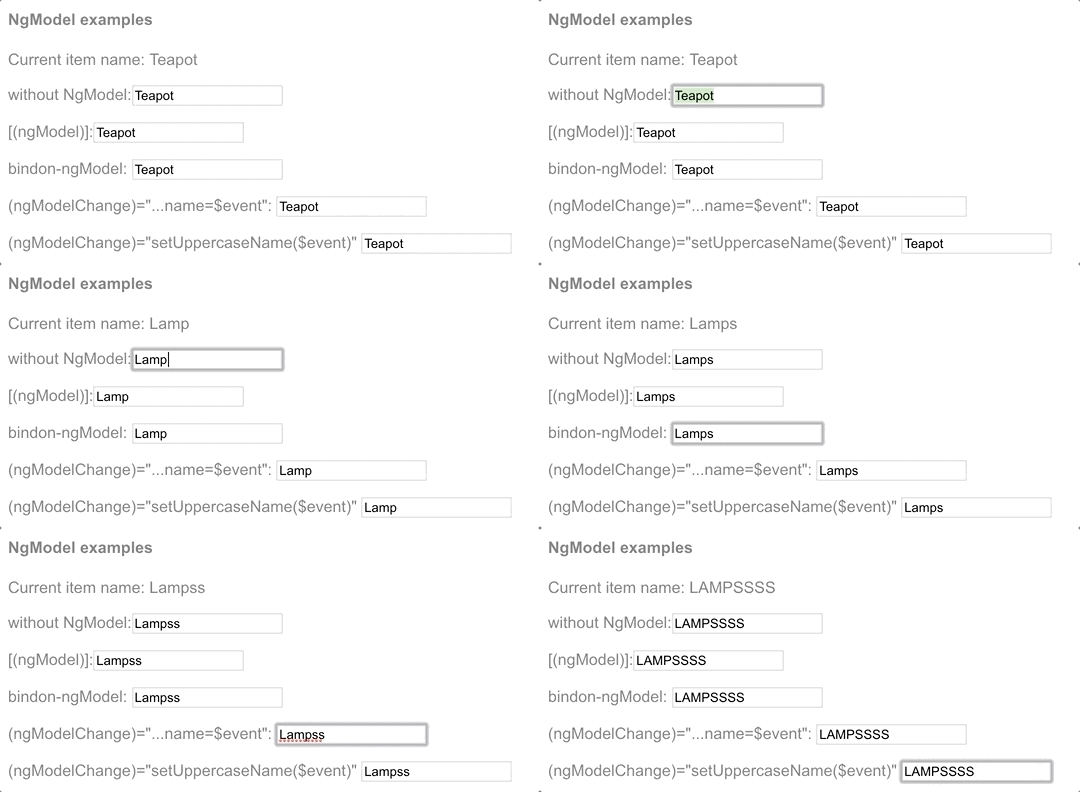
<input [ngModel]="currentItem.name" (ngModelChange)="setUppercaseName($event)" id="example-uppercase">这里是所有这些变体的动画,包括这个大写转换的版本:

NgModel 和值访问器
NgModel 指令适用于ControlValueAccessor支持的元素。Angular 为所有基本 HTML 表单元素提供了值访问器。
要将 [(ngModel)] 应用于非表单型内置元素或第三方自定义组件,必须编写一个值访问器。
编写 Angular 组件时,如果根据 Angular 的双向绑定语法命名 value 和 event 属性,则不需要用值访问器(ControlValueAccessor)或
NgModel。
内置结构型指令
结构型指令的职责是 HTML 布局。 它们塑造或重塑 DOM 的结构,这通常是通过添加、移除和操纵它们所附加到的宿主元素来实现的。
本节会介绍最常见的内置结构型指令:
-
NgIf—— 从模板中创建或销毁子视图。 -
NgFor—— 为列表中的每个条目重复渲染一个节点。 -
NgSwitch—— 一组在备用视图之间切换的指令。
用 NgIf 添加或删除元素
可以将 NgIf 指令应用于宿主元素来添加或删除元素。
如果 NgIf 为 false,则 Angular 将从 DOM 中移除一个元素及其后代。然后,Angular 会销毁其组件,从而释放内存和资源。
要添加或删除元素,请在以下示例 *ngIf 绑定到条件表达式,例如 isActive
<app-item-detail *ngIf="isActive" [item]="item"></app-item-detail>当 isActive 表达式返回真值时,NgIf 会把 ItemDetailComponent 添加到 DOM 中。当表达式为假值时,NgIf 会从 DOM 中删除 ItemDetailComponent 并销毁该组件及其所有子组件。
防止 null
默认情况下,NgIf 会阻止显示已绑定到空值的元素。
要使用 NgIf 保护 <div>,请将 *ngIf="yourProperty" 添加到此 <div>。在下面的例子中,currentCustomer 名字出现了,是因为确实存在一个 currentCustomer。
<div *ngIf="currentCustomer">Hello, {{currentCustomer.name}}</div>但是,如果该属性为 null,则 Angular 就不会显示 <div>。在这个例子中,Angular 就不会显示 nullCustomer,因为它为 null。
<div *ngIf="nullCustomer">Hello, <span>{{nullCustomer}}</span></div>NgFor 条目列表
可以用 NgFor 来指令显示条目列表。
- 定义一个 HTML 块,该块会决定 Angular 如何渲染单个条目。
- 要列出你的条目,请把一个简写形式
let item of items 赋值给 *ngFor。
<div *ngFor="let item of items">{{item.name}}</div>字符串 "let item of items" 会指示 Angular 执行以下操作:
- 将
items中的每个条目存储在局部循环变量 item中 - 让每个条目都可用于每次迭代时的模板 HTML 中
- 将
"let item of items" 转换为环绕宿主元素的 <ng-template>
- 对列表中的每个
item复写这个 <ng-template>
复写组件视图
要复写某个组件元素,请将 *ngFor 应用于其选择器。在以下示例中,选择器为 <app-item-detail>。
<app-item-detail *ngFor="let item of items" [item]="item"></app-item-detail>你可以在以下位置引用模板输入变量,例如 item:
- 在
ngFor的宿主元素中 - 在宿主元素的后代中,用以访问条目的属性
以下示例首先在插值中引用 item,然后将它通过绑定传递给 <app-item-detail> 组件的 item 属性。
<div *ngFor="let item of items">{{item.name}}</div>
<!-- . . . -->
<app-item-detail *ngFor="let item of items" [item]="item"></app-item-detail>
获取 *ngFor 的 index
可以获取 *ngFor 的 index,并在模板中使用它。
在 *ngFor 中,添加一个分号和 let i=index 简写形式。下面的例子中把 index 取到一个名为 i 的变量中,并将其与条目名称一起显示。
<div *ngFor="let item of items; let i=index">{{i + 1}} - {{item.name}}</div>NgFor 指令上下文的 index 属性在每次迭代中都会返回该条目的从零开始的索引号。
Angular 会将此指令转换为 <ng-template>,然后反复使用此模板为列表中的每个 item 创建一组新的元素和绑定。
当条件为真时复写元素
要在特定条件为 true 时复写 HTML 块,请将 *ngIf 放在 *ngFor 元素的容器元素上。它们之一或两者都可以是 <ng-container>,这样你就不必引入额外的 HTML 层次了。
由于结构型指令会在 DOM 中添加和删除节点,因此每个元素只能应用一个结构型指令。
用 *ngFor 的 trackBy 跟踪条目
通过跟踪对条目列表的更改,可以减少应用程序对服务器的调用次数。使用 *ngFor 的 trackBy 属性,Angular 只能更改和重新渲染已更改的条目,而不必重新加载整个条目列表。
- 向该组件添加一个方法,该方法返回
NgFor应该跟踪的值。这个例子中,该值是英雄的 id。如果浏览器已经渲染过此 id,Angular 就会跟踪它,而不会重新向服务器查询相同的 id。 - 在简写表达式中,将
trackBy设置为 trackByItems() 方法。
trackByItems(index: number, item: Item): number { return item.id; }<div *ngFor="let item of items; trackBy: trackByItems">
({{item.id}}) {{item.name}}
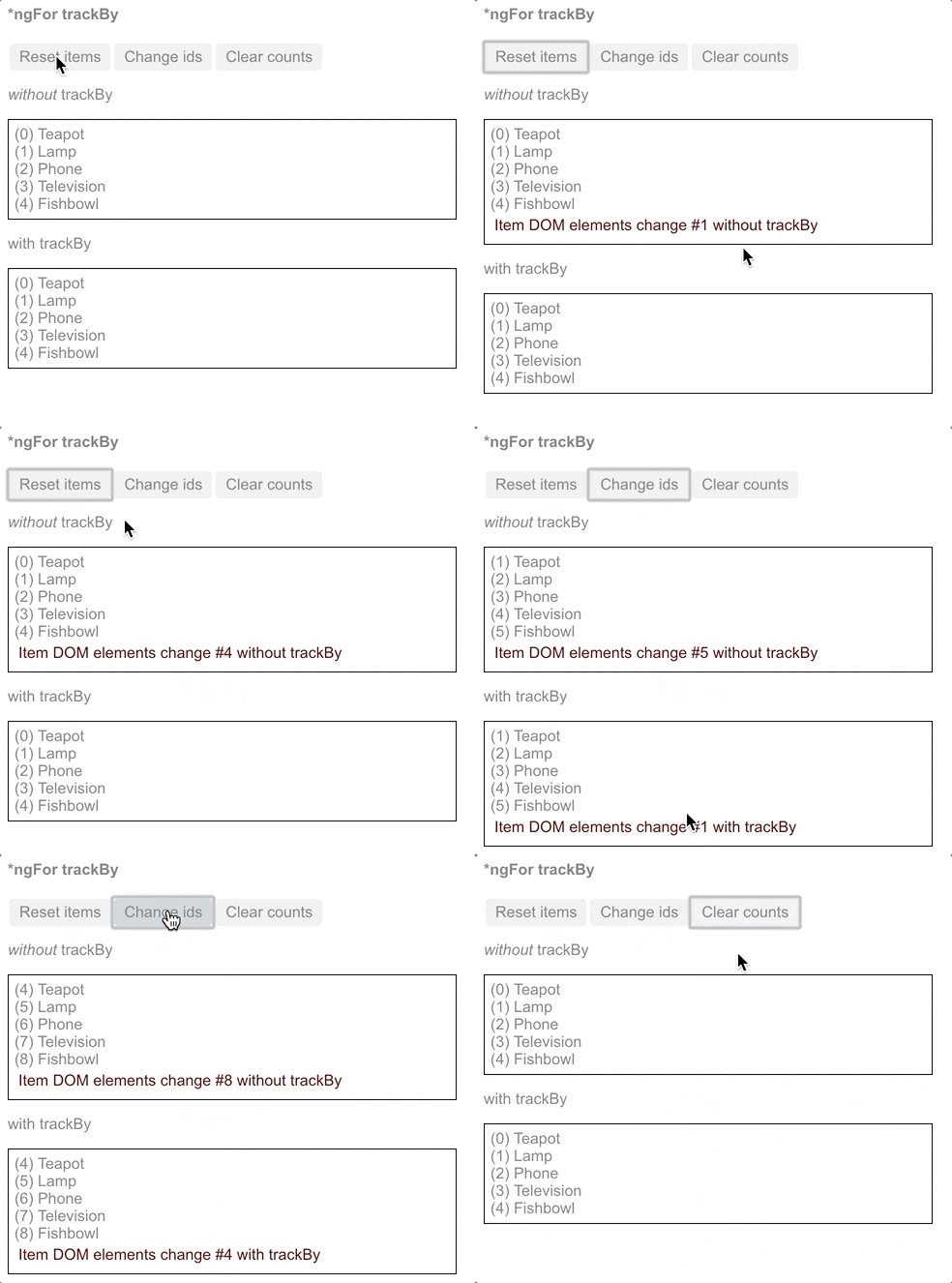
</div>更改这些 ID 会使用新的 item.id 创建新的条目。在下面的 trackBy 效果演示中,Reset items 会创建一些具有和以前相同的 item.id 的新条目。
- 如果没有
trackBy,这些按钮都会触发完全的 DOM 元素替换。 - 有了
trackBy,则只有修改了 id的按钮才会触发元素替换。
为没有 DOM 元素的指令安排宿主
Angular 的 <ng-container> 是一个分组元素,它不会干扰样式或布局,因为 Angular 不会将其放置在 DOM 中。
当没有单个元素承载指令时,可以使用 <ng-container>。
这是使用 <ng-container> 的条件化段落。
<p>
  I turned the corner
  <ng-container *ngIf="hero">
    and saw {{hero.name}}. I waved
  </ng-container>
  and continued on my way.
</p> 
- 从
FormsModule中导入 ngModel指令。 - 将
FormsModule添加到相关 Angular 模块的 imports 部分。 - 要有条件地排除
<option>,请将 <option> 包裹在 <ng-container> 中。
<div>
  Pick your favorite hero
  (<label><input type="checkbox" checked (change)="showSad = !showSad">show sad</label>)
</div>
<select [(ngModel)]="hero">
  <ng-container *ngFor="let h of heroes">
    <ng-container *ngIf="showSad || h.emotion !== sad">
      <option [ngValue]="h">{{h.name}} ({{h.emotion}})</option>
    </ng-container>
  </ng-container>
</select> 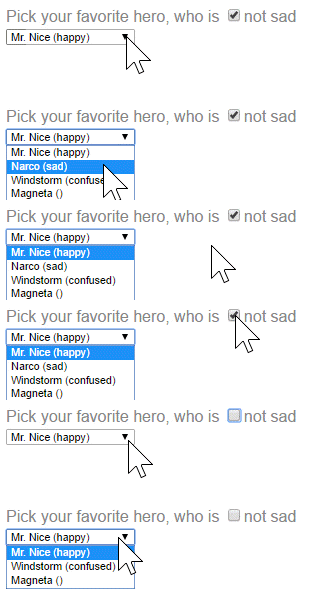
用 NgSwitch
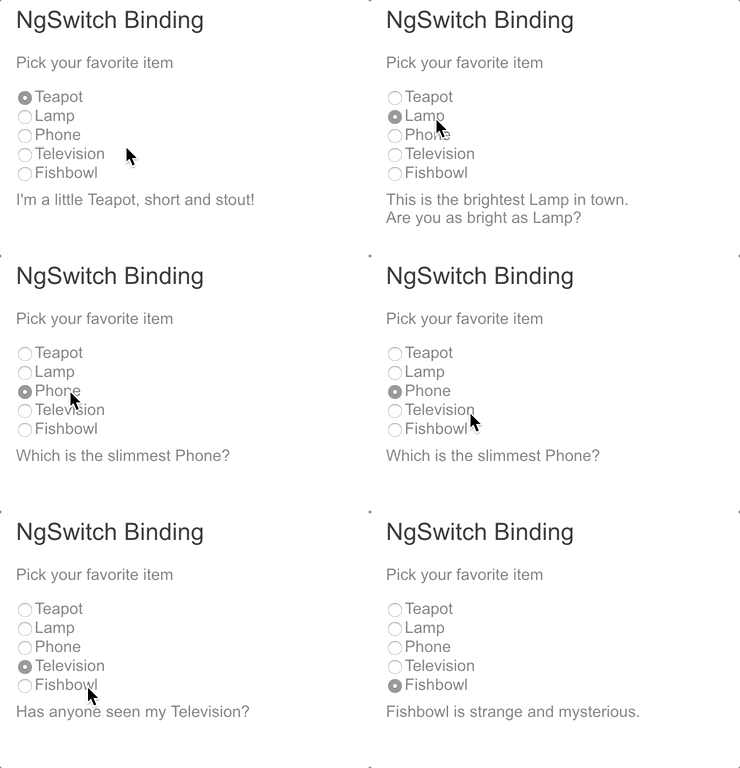
就像 JavaScript 的 switch 语句一样。NgSwitch 会根据切换条件显示几个可能的元素中的一个。Angular 只会将选定的元素放入 DOM。
NgSwitch 是一组指令(共三个):
-
NgSwitch—— 一个属性型指令,它更改其伴生指令的行为。 -
NgSwitchCase—— 结构型指令,当其绑定值等于开关值时将其元素添加到 DOM 中,而在其不等于开关值时将其绑定值移除。 -
NgSwitchDefault—— 结构型指令,当没有选中的 NgSwitchCase时,将其宿主元素添加到 DOM 中。
- 在每个元素(比如
<div>)上,把 [ngSwitch] 绑定到一个返回开关值的表达式(例如 feature)。尽管这个例子中 feature值是字符串,但此开关值可以是任何类型。 - 将各个分支元素绑定到
*ngSwitchCase 和 *ngSwitchDefault。 - 在父组件中,定义
currentItem以便可以在 [ngSwitch] 表达式中使用它。 - 在每个子组件中,添加一个输入属性
item,该属性会绑定到父组件的 currentItem。以下两个片段显示了父组件和其中一个子组件。其他子组件与 StoutItemComponent中的相同。
<div [ngSwitch]="currentItem.feature">
  <app-stout-item    *ngSwitchCase="stout"    [item]="currentItem"></app-stout-item>
  <app-device-item   *ngSwitchCase="slim"     [item]="currentItem"></app-device-item>
  <app-lost-item     *ngSwitchCase="vintage"  [item]="currentItem"></app-lost-item>
  <app-best-item     *ngSwitchCase="bright"   [item]="currentItem"></app-best-item>
<!-- . . . -->
  <app-unknown-item  *ngSwitchDefault           [item]="currentItem"></app-unknown-item>
</div>currentItem!: Item;export class StoutItemComponent {
@Input() item!: Item;
} 
Switch 指令也同样适用于内置 HTML 元素和 Web Component。 比如,你可以像下面的例子中一样把 <app-best-item> 分支替换为 <div>。
<div *ngSwitchCase="bright"> Are you as bright as {{currentItem.name}}?</div>作者:冒牌SEO,如若转载,请注明出处:https://www.web176.com/angular13/24136.html
 支付宝
支付宝  微信
微信 