
nginx已经配置server及端口20002,telnet不通:
telnet 127.0.0.1 20002 Trying 127.0.0.1… telnet: connect to address 127.0.0.1: Connection refused
一、检查
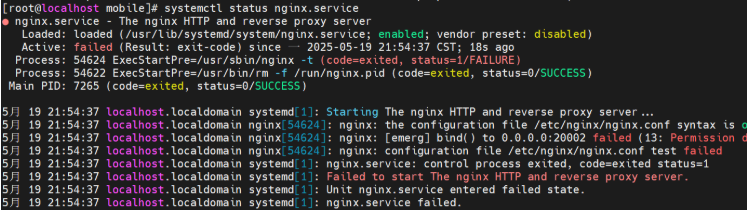
systemctl status nginx.service
nginx: [emerg] bind() to 0.0.0.0:20002 failed (13: Permission denied)

二、解决阻止nginx bind端口问题
yum install policycoreutils-python
semanage port -a -t http_port_t -p tcp 20002| 问题 | CentOS 7 解决方案 |
|---|---|
| dnf 不可用 | 使用 yum |
| semanage 不可用 | yum install policycoreutils-python |
| SELinux 阻止 Nginx 绑定端口 | semanage port -a -t http_port_t -p tcp 20002 |
| 临时测试 SELinux 影响 | setenforce 0(仅测试用) |
| 检查端口是否被占用 | ss -tulnp | grep 20002 |
systemctl restart nginx四、本地测试
curl http://localhost:20002 本地访问响应OK
五、远端测试
客户端通过游览器访问http://ip:20002 无响应
开放端口
sudo firewall-cmd --zone=public --add-port=20002/tcp --permanent
sudo firewall-cmd --reload
sudo firewall-cmd --list-ports
客户端通过游览器访问http://ip:20002 响应OK。
作者:terry,如若转载,请注明出处:https://www.web176.com/news/frontend/28604.html
 支付宝
支付宝  微信
微信 