
在本章中,我们将构建一个客户端应用程序,该客户端应用程序允许两个用户在不同的设备上使用WebRTC相互发送消息。我们的应用程序将有两页。一个用于登录,另一个用于向其他用户发送消息。
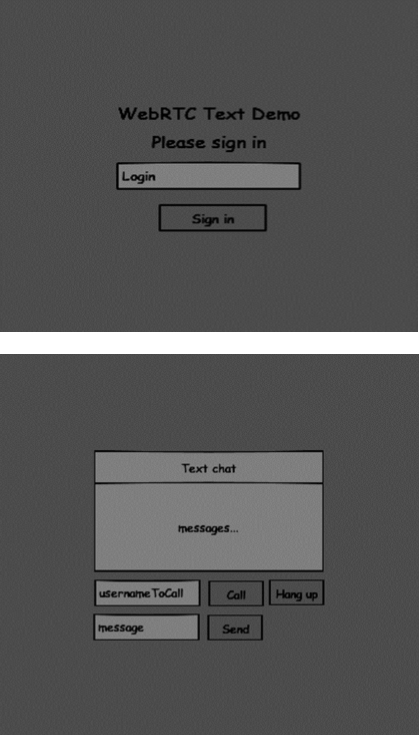

这两个页面将是div标签。大多数输入是通过简单的事件处理程序完成的。
信令服务器
要创建WebRTC连接,客户端必须能够在不使用WebRTC对等连接的情况下传输消息。在这里我们将使用HTML5 WebSockets-两个端点之间的双向套接字连接-Web服务器和Web浏览器。现在让我们开始使用WebSocket库。创建server.js文件并插入以下代码:
//require our websocket library
var WebSocketServer = require('ws').Server;

//creating a websocket server at port 9090
var wss = new WebSocketServer({port: 9090});

//when a user connects to our sever
wss.on('connection', function(connection) {
   console.log("user connected");

   //when server gets a message from a connected user
   connection.on('message', function(message) {
      console.log("Got message from a user:", message);
   });

   connection.send("Hello from server");
});第一行需要我们已经安装的WebSocket库。然后,我们在端口9090上创建一个套接字服务器。接下来,我们监听连接事件。当用户与服务器建立WebSocket连接时,将执行此代码。然后,我们收听用户发送的任何消息。最后,我们向连接的用户发送回复,说“来自服务器的问候”。
在信令服务器中,我们将为每个连接使用基于字符串的用户名,以便我们知道将消息发送到哪里。让我们稍微改变一下连接处理程序:
connection.on('message', function(message) {
   var data;

   //accepting only JSON messages
   try {
      data = JSON.parse(message);
   } catch (e) {
      console.log("Invalid JSON");
      data = {};
   }
});
这样,我们仅接受JSON消息。接下来,我们需要将所有连接的用户存储在某个地方。我们将使用一个简单的Javascript对象。更改文件的顶部:
//require our websocket library
var WebSocketServer = require('ws').Server;

//creating a websocket server at port 9090
var wss = new WebSocketServer({port: 9090});

//all connected to the server users
var users = {};我们将为来自客户端的每条消息添加一个类型字段。例如,如果用户要登录,则他发送登录类型消息。让我们定义它:
connection.on('message', function(message) {
   var data;

   //accepting only JSON messages
   try {
      data = JSON.parse(message);
   } catch (e) {
      console.log("Invalid JSON");
      data = {};
   }

   //switching type of the user message
   switch (data.type) {
      //when a user tries to login
      case "login":
         console.log("User logged:", data.name);

         //if anyone is logged in with this username then refuse
         if(users[data.name]) {
            sendTo(connection, {
               type: "login",
               success: false
            });
         } else {
            //save user connection on the server
            users[data.name] = connection;
            connection.name = data.name;

            sendTo(connection, {
               type: "login",
               success: true
            });
         }

         break;

      default:
         sendTo(connection, {
            type: "error",
            message: "Command no found: " + data.type
         });

         break;
   }
});如果用户使用登录类型发送消息:
- 检查是否有人已经使用该用户名登录。
- 如果是这样,则告诉用户他尚未成功登录。
- 如果没有人使用此用户名,则将用户名添加为连接对象的键。
- 如果无法识别命令,我们将发送错误。
以下代码是用于将消息发送到连接的帮助程序功能。将其添加到server.js文件:
function sendTo(connection, message) {
   connection.send(JSON.stringify(message));
}当用户断开连接时,我们应该清理其连接。当关闭事件触发时,我们可以删除用户。将以下代码添加到连接处理程序:
connection.on("close", function() {
   if(connection.name) {
      delete users[connection.name];
   }
});成功登录后,用户要呼叫另一个。他应该向其他用户提出要约。添加报价处理程序:
case "offer":
   //for ex. UserA wants to call UserB
   console.log("Sending offer to: ", data.name);

   //if UserB exists then send him offer details
   var conn = users[data.name];

   if(conn != null){
   //setting that UserA connected with UserB
   connection.otherName = data.name;

      sendTo(conn, {
         type: "offer",
         offer: data.offer,
         name: connection.name
      });

break;首先,我们获得了要呼叫的用户的连接。如果存在,我们会向他发送报价详细信息。我们还将otherName添加到连接对象。这样做是为了以后找到它的简单性。
对响应进行回答的方式与要约处理程序中使用的方式类似。我们的服务器刚刚通过的所有消息的答案给其他用户。添加后,下面的代码提供处理程序:
case "answer":
   console.log("Sending answer to: ", data.name);

   //for ex. UserB answers UserA
   var conn = users[data.name];

   if(conn != null) {
      connection.otherName = data.name;
      sendTo(conn, {
         type: "answer",
         answer: data.answer
      });
   }

break;最后一部分是处理用户之间的ICE候选者。我们使用相同的技术只是在用户之间传递消息。主要区别在于候选消息可能以任意顺序在每个用户身上多次出现。添加候选处理程序:
case "candidate":
   console.log("Sending candidate to:",data.name);
   var conn = users[data.name];

   if(conn != null) {
      sendTo(conn, {
         type: "candidate",
         candidate: data.candidate
      });
   }

break;为了允许我们的用户与另一个用户断开连接,我们应该实现挂断功能。它还将告诉服务器删除所有用户引用。添加请假处理程序:
case "leave":
   console.log("Disconnecting from", data.name);
   var conn = users[data.name];
   conn.otherName = null;

   //notify the other user so he can disconnect his peer connection
   if(conn != null) {
      sendTo(conn, {
         type: "leave"
      });
   }

break; 这还将向其他用户发送请假事件,以便他可以相应地断开其对等连接。当用户从信令服务器断开连接时,我们也应该处理这种情况。让我们修改关闭处理程序:
connection.on("close", function() {

   if(connection.name) {
      delete users[connection.name];

      if(connection.otherName) {
         console.log("Disconnecting from ", connection.otherName);
         var conn = users[connection.otherName];
         conn.otherName = null;

         if(conn != null) {
            sendTo(conn, {
               type: "leave"
            });
         }
      }
   }
});
以下是我们的信令服务器的完整代码:
//require our websocket library
var WebSocketServer = require('ws').Server;

//creating a websocket server at port 9090
var wss = new WebSocketServer({port: 9090});

//all connected to the server users
var users = {};

//when a user connects to our sever
wss.on('connection', function(connection) {

   console.log("User connected");

   //when server gets a message from a connected user
   connection.on('message', function(message) {

      var data;
      //accepting only JSON messages
      try {
         data = JSON.parse(message);
      } catch (e) {
         console.log("Invalid JSON");
         data = {};
      }

      //switching type of the user message
      switch (data.type) {
         //when a user tries to login
         case "login":
            console.log("User logged", data.name);
            //if anyone is logged in with this username then refuse
            if(users[data.name]) {
               sendTo(connection, {
                  type: "login",
                  success: false
               });
            } else {
               //save user connection on the server
               users[data.name] = connection;
               connection.name = data.name;

               sendTo(connection, {
                  type: "login",
                  success: true
               });
            }

            break;

         case "offer":
            //for ex. UserA wants to call UserB
            console.log("Sending offer to: ", data.name);

            //if UserB exists then send him offer details
            var conn = users[data.name];

            if(conn != null) {
               //setting that UserA connected with UserB
               connection.otherName = data.name;

               sendTo(conn, {
                  type: "offer",
                  offer: data.offer,
                  name: connection.name
               });
            }

            break;

         case "answer":
            console.log("Sending answer to: ", data.name);
            //for ex. UserB answers UserA
            var conn = users[data.name];

            if(conn != null) {
               connection.otherName = data.name;
               sendTo(conn, {
                  type: "answer",
                  answer: data.answer
               });
            }

            break;

         case "candidate":
            console.log("Sending candidate to:",data.name);
            var conn = users[data.name];

            if(conn != null) {
               sendTo(conn, {
                  type: "candidate",
                  candidate: data.candidate
               });
            }

            break;

         case "leave":
            console.log("Disconnecting from", data.name);
            var conn = users[data.name];
            conn.otherName = null;

            //notify the other user so he can disconnect his peer connection
            if(conn != null) {
               sendTo(conn, {
                  type: "leave"
               });
            }

            break;

         default:
            sendTo(connection, {
               type: "error",
               message: "Command not found: " + data.type
            });

            break;

      }
   });

   //when user exits, for example closes a browser window
   //this may help if we are still in "offer","answer" or "candidate" state
   connection.on("close", function() {

      if(connection.name) {
         delete users[connection.name];

         if(connection.otherName) {
            console.log("Disconnecting from ", connection.otherName);
            var conn = users[connection.otherName];
            conn.otherName = null;

            if(conn != null) {
               sendTo(conn, {
                  type: "leave"
               });
            }
         }
      }
   });

   connection.send("Hello world");

});

function sendTo(connection, message) {
   connection.send(JSON.stringify(message));
}
客户申请
测试该应用程序的一种方法是打开两个浏览器选项卡,然后尝试互相发送消息。
首先,我们需要安装引导程序库。Bootstrap是用于开发Web应用程序的前端框架。您可以在http://getbootstrap.com/上了解更多信息。创建一个名为“ textchat”的文件夹。这将是我们的根应用程序文件夹。在此文件夹中创建一个文件package.json(管理npm依赖项是必需的)并添加以下内容:
{
   "name": "webrtc-textochat",
   "version": "0.1.0",
   "description": "webrtc-textchat",
   "author": "Author",
   "license": "BSD-2-Clause"
}然后运行npm install bootstrap。这会将引导程序库安装在textchat / node_modules文件夹中。
现在我们需要创建一个基本的HTML页面。使用以下代码在根文件夹中创建index.html文件:
<html>

   <head>
      <title>WebRTC Text Demo</title>
      <link rel = "stylesheet" href = "node_modules/bootstrap/dist/css/bootstrap.min.css"/>
   </head>

   <style>
      body {
         background: #eee;
         padding: 5% 0;
      }
   </style>

   <body>
      <div id = "loginPage" class = "container text-center">

         <div class = "row">
            <div class = "col-md-4 col-md-offset-4">
               <h2>WebRTC Text Demo. Please sign in</h2>
               <label for = "usernameInput" class = "sr-only">Login</label>
               <input type = "email" id = "usernameInput"
                  class = "form-control formgroup" placeholder = "Login"
                  required = "" autofocus = "">
               <button id = "loginBtn" class = "btn btn-lg btn-primary btnblock">
                  Sign in</button>
            </div>
         </div>

      </div>

      <div id = "callPage" class = "call-page container">

         <div class = "row">
            <div class = "col-md-4 col-md-offset-4 text-center">
               <div class = "panel panel-primary">
                  <div class = "panel-heading">Text chat</div>
                  <div id = "chatarea" class = "panel-body text-left"></div>
               </div>
            </div>
         </div>

         <div class = "row text-center form-group">
            <div class = "col-md-12">
               <input id = "callToUsernameInput" type = "text"
                  placeholder = "username to call" />
               <button id = "callBtn" class = "btn-success btn">Call</button>
               <button id = "hangUpBtn" class = "btn-danger btn">Hang Up</button>
            </div>
         </div>

         <div class = "row text-center">
            <div class = "col-md-12">
               <input id = "msgInput" type = "text" placeholder = "message" />
               <button id = "sendMsgBtn" class = "btn-success btn">Send</button>
            </div>
         </div>

      </div>

      <script src = "client.js"></script>

   </body>

</html>您应该熟悉此页面。我们添加了引导css文件。我们还定义了两个页面。最后,我们创建了几个文本字段和按钮,用于从用户那里获取信息。在“聊天”页面上,您应该看到带有“ chatarea” ID的div标签,将在其中显示我们所有的消息。请注意,我们已经添加了指向client.js文件的链接。
现在我们需要与我们的信令服务器建立连接。使用以下代码在根文件夹中创建client.js文件:
//our username
var name;
var connectedUser;

//connecting to our signaling server
var conn = new WebSocket('ws://localhost:9090');

conn.onopen = function () {
   console.log("Connected to the signaling server");
};

//when we got a message from a signaling server
conn.onmessage = function (msg) {
   console.log("Got message", msg.data);

   var data = JSON.parse(msg.data);

   switch(data.type) {
      case "login":
         handleLogin(data.success);
         break;
      //when somebody wants to call us
      case "offer":
         handleOffer(data.offer, data.name);
         break;
      case "answer":
         handleAnswer(data.answer);
         break;
      //when a remote peer sends an ice candidate to us
      case "candidate":
         handleCandidate(data.candidate);
         break;
      case "leave":
         handleLeave();
         break;
      default:
         break;
   }
};

conn.onerror = function (err) {
   console.log("Got error", err);
};

//alias for sending JSON encoded messages
function send(message) {
   //attach the other peer username to our messages
   if (connectedUser) {
      message.name = connectedUser;
   }

   conn.send(JSON.stringify(message));
};现在通过节点服务器运行我们的信令服务器。然后,在根文件夹中运行static命令并在浏览器中打开页面。您应该看到以下控制台输出:

下一步是使用唯一的用户名实现用户登录。我们只需将用户名发送到服务器,然后服务器告诉我们是否已使用该用户名。将以下代码添加到client.js文件中:
//******
//UI selectors block
//******

var loginPage = document.querySelector('#loginPage');
var usernameInput = document.querySelector('#usernameInput');
var loginBtn = document.querySelector('#loginBtn');

var callPage = document.querySelector('#callPage');
var callToUsernameInput = document.querySelector('#callToUsernameInput');
var callBtn = document.querySelector('#callBtn');

var hangUpBtn = document.querySelector('#hangUpBtn');
callPage.style.display = "none";

// Login when the user clicks the button
loginBtn.addEventListener("click", function (event) {
   name = usernameInput.value;

   if (name.length > 0) {
      send({
         type: "login",
         name: name
      });
   }

});

function handleLogin(success) {

   if (success === false) {
      alert("Ooops...try a different username");
   } else {
      loginPage.style.display = "none";
      callPage.style.display = "block";

      //**********************
      //Starting a peer connection
      //**********************
   }

};
首先,我们选择一些对页面上元素的引用。我们隐藏了呼叫页面。然后,我们在登录按钮上添加一个事件侦听器。当用户单击它时,我们会将其用户名发送到服务器。最后,我们实现handleLogin回调。如果登录成功,我们将显示呼叫页面,建立对等连接并创建数据通道。
要开始与数据通道的对等连接,我们需要:
- 创建RTCPeerConnection对象
- 在我们的RTCPeerConnection对象中创建一个数据通道
将以下代码添加到“ UI选择器块”
var msgInput = document.querySelector('#msgInput');
var sendMsgBtn = document.querySelector('#sendMsgBtn');
var chatArea = document.querySelector('#chatarea');

var yourConn;
var dataChannel;修改handleLogin函数
function handleLogin(success) {
   if (success === false) {
      alert("Ooops...try a different username");
   } else {
      loginPage.style.display = "none";
      callPage.style.display = "block";

      //**********************
      //Starting a peer connection
      //**********************

      //using Google public stun server
      var configuration = {
         "iceServers": [{ "url": "stun:stun2.1.google.com:19302" }]
      };

      yourConn = new webkitRTCPeerConnection(configuration, {optional: [{RtpDataChannels: true}]});

      // Setup ice handling
      yourConn.onicecandidate = function (event) {
         if (event.candidate) {
            send({
               type: "candidate",
               candidate: event.candidate
            });
         }
      };

      //creating data channel
      dataChannel = yourConn.createDataChannel("channel1", {reliable:true});

      dataChannel.onerror = function (error) {
         console.log("Ooops...error:", error);
      };

      //when we receive a message from the other peer, display it on the screen
      dataChannel.onmessage = function (event) {
         chatArea.innerHTML += connectedUser + ": " + event.data + "<br />";
      };

      dataChannel.onclose = function () {
         console.log("data channel is closed");
      };
   }
};如果登录成功,则应用程序将创建RTCPeerConnection对象并设置onicecandidate处理程序,该处理程序会将找到的所有icecandidates发送给另一个对等方。它还创建一个dataChannel。请注意,在创建RTCPeerConnection对象时,如果使用的是Chrome或Opera,则构造函数可选的第二个参数[{RtpDataChannels:true}]是必需的。下一步是向其他对等方创建要约。用户获得报价后,他将创建答案并开始交易ICE候选人。将以下代码添加到client.js文件
//initiating a call
callBtn.addEventListener("click", function () {
   var callToUsername = callToUsernameInput.value;

   if (callToUsername.length > 0) {

      connectedUser = callToUsername;

      // create an offer
      yourConn.createOffer(function (offer) {

         send({
            type: "offer",
            offer: offer
         });

         yourConn.setLocalDescription(offer);

      }, function (error) {
         alert("Error when creating an offer");
      });
   }
});

//when somebody sends us an offer
function handleOffer(offer, name) {
   connectedUser = name;
   yourConn.setRemoteDescription(new RTCSessionDescription(offer));

   //create an answer to an offer
   yourConn.createAnswer(function (answer) {
      yourConn.setLocalDescription(answer);

      send({
         type: "answer",
         answer: answer
      });

   }, function (error) {
      alert("Error when creating an answer");
   });
};

//when we got an answer from a remote user
function handleAnswer(answer) {
   yourConn.setRemoteDescription(new RTCSessionDescription(answer));
};

//when we got an ice candidate from a remote user
function handleCandidate(candidate) {
   yourConn.addIceCandidate(new RTCIceCandidate(candidate));
};我们增加一个点击处理程序呼叫按钮,从而启动的报价。然后,我们实现onmessage处理程序期望的几个处理程序。它们将被异步处理,直到两个用户都建立了连接。
下一步是实现挂断功能。这将停止传输数据,并告诉其他用户关闭数据通道。添加以下代码:
//hang up
hangUpBtn.addEventListener("click", function () {
   send({
      type: "leave"
   });

   handleLeave();
});

function handleLeave() {
   connectedUser = null;
   yourConn.close();
   yourConn.onicecandidate = null;
};
当用户单击“挂断”按钮时-
- 它将向其他用户发送“离开”消息。
- 它将关闭RTCPeerConnection和数据通道。
最后一步是向另一个对等方发送消息。将“点击”处理程序添加到“发送消息”按钮中
//when user clicks the "send message" button
sendMsgBtn.addEventListener("click", function (event) {
   var val = msgInput.value;
   chatArea.innerHTML += name + ": " + val + "<br />";

   //sending a message to a connected peer
   dataChannel.send(val);
   msgInput.value = "";
});
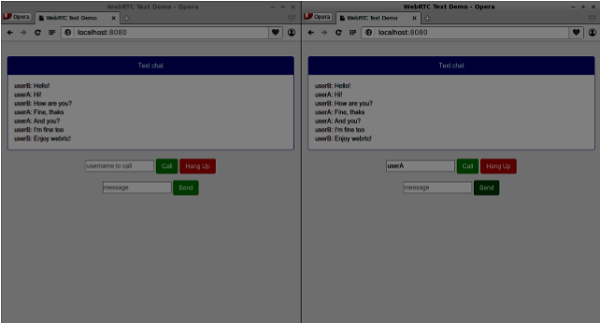
现在运行代码。您应该能够使用两个浏览器选项卡登录到服务器。然后,您可以通过单击“挂断”按钮来建立与其他用户的对等连接,并向他发送消息以及关闭数据通道。
以下是整个client.js文件
//our username
var name;
var connectedUser;

//connecting to our signaling server
var conn = new WebSocket('ws://localhost:9090');

conn.onopen = function () {
   console.log("Connected to the signaling server");
};

//when we got a message from a signaling server
conn.onmessage = function (msg) {
   console.log("Got message", msg.data);
   var data = JSON.parse(msg.data);

   switch(data.type) {
      case "login":
         handleLogin(data.success);
         break;
      //when somebody wants to call us
      case "offer":
         handleOffer(data.offer, data.name);
         break;
      case "answer":
         handleAnswer(data.answer);
         break;
      //when a remote peer sends an ice candidate to us
      case "candidate":
         handleCandidate(data.candidate);
         break;
      case "leave":
         handleLeave();
         break;
      default:
         break;
   }
};

conn.onerror = function (err) {
   console.log("Got error", err);
};

//alias for sending JSON encoded messages
function send(message) {

   //attach the other peer username to our messages
   if (connectedUser) {
      message.name = connectedUser;
   }

   conn.send(JSON.stringify(message));
};

//******
//UI selectors block
//******

var loginPage = document.querySelector('#loginPage');
var usernameInput = document.querySelector('#usernameInput');
var loginBtn = document.querySelector('#loginBtn');

var callPage = document.querySelector('#callPage');
var callToUsernameInput = document.querySelector('#callToUsernameInput');
var callBtn = document.querySelector('#callBtn');

var hangUpBtn = document.querySelector('#hangUpBtn');
var msgInput = document.querySelector('#msgInput');
var sendMsgBtn = document.querySelector('#sendMsgBtn');

var chatArea = document.querySelector('#chatarea');
var yourConn;
var dataChannel;
callPage.style.display = "none";

// Login when the user clicks the button
loginBtn.addEventListener("click", function (event) {
   name = usernameInput.value;

   if (name.length > 0) {
      send({
         type: "login",
         name: name
      });
   }

});

function handleLogin(success) {

   if (success === false) {
      alert("Ooops...try a different username");
   } else {
      loginPage.style.display = "none";
      callPage.style.display = "block";

      //**********************
      //Starting a peer connection
      //**********************

      //using Google public stun server
      var configuration = {
         "iceServers": [{ "url": "stun:stun2.1.google.com:19302" }]
      };

      yourConn = new webkitRTCPeerConnection(configuration, {optional: [{RtpDataChannels: true}]});

      // Setup ice handling
      yourConn.onicecandidate = function (event) {
         if (event.candidate) {
            send({
               type: "candidate",
               candidate: event.candidate
            });
         }
      };

      //creating data channel
      dataChannel = yourConn.createDataChannel("channel1", {reliable:true});

      dataChannel.onerror = function (error) {
         console.log("Ooops...error:", error);
      };

      //when we receive a message from the other peer, display it on the screen
      dataChannel.onmessage = function (event) {
         chatArea.innerHTML += connectedUser + ": " + event.data + "<br />";
      };

      dataChannel.onclose = function () {
         console.log("data channel is closed");
      };

   }
};

//initiating a call
callBtn.addEventListener("click", function () {
   var callToUsername = callToUsernameInput.value;

   if (callToUsername.length > 0) {
      connectedUser = callToUsername;
      // create an offer
      yourConn.createOffer(function (offer) {
         send({
            type: "offer",
            offer: offer
         });
         yourConn.setLocalDescription(offer);
      }, function (error) {
         alert("Error when creating an offer");
      });
   }

});

//when somebody sends us an offer
function handleOffer(offer, name) {
   connectedUser = name;
   yourConn.setRemoteDescription(new RTCSessionDescription(offer));

   //create an answer to an offer
   yourConn.createAnswer(function (answer) {
      yourConn.setLocalDescription(answer);
      send({
         type: "answer",
         answer: answer
      });
   }, function (error) {
      alert("Error when creating an answer");
   });

};

//when we got an answer from a remote user
function handleAnswer(answer) {
   yourConn.setRemoteDescription(new RTCSessionDescription(answer));
};

//when we got an ice candidate from a remote user
function handleCandidate(candidate) {
   yourConn.addIceCandidate(new RTCIceCandidate(candidate));
};

//hang up
hangUpBtn.addEventListener("click", function () {
   send({
      type: "leave"
   });

   handleLeave();
});

function handleLeave() {
   connectedUser = null;
   yourConn.close();
   yourConn.onicecandidate = null;
};

//when user clicks the "send message" button
sendMsgBtn.addEventListener("click", function (event) {
   var val = msgInput.value;
   chatArea.innerHTML += name + ": " + val + "<br />";

   //sending a message to a connected peer
   dataChannel.send(val);
   msgInput.value = "";
});
作者:terry,如若转载,请注明出处:https://www.web176.com/webrtc/712.html
 支付宝
支付宝  微信
微信 