
假设我们要创建一个行为,使该行为所附加的组件的“ name”属性大写。
步骤1-在components文件夹内,使用以下代码创建一个名为UppercaseBehavior.php的文件。
<?php
   namespace app\components;
   use yii\base\Behavior;
   use yii\db\ActiveRecord;
   class UppercaseBehavior extends Behavior {
      public function events() {
         return [
            ActiveRecord::EVENT_BEFORE_VALIDATE => 'beforeValidate',
         ];
      }
      public function beforeValidate($event) {
         $this->owner->name = strtoupper($this->owner->name);
     }
   }
?>在上面的代码中,我们创建了UppercaseBehavior,当触发“ beforeValidate”事件时,name属性大写。
步骤2-将此行为附加到MyUser模型,请以这种方式进行修改。
<?php
   namespace app\models;
   use app\components\UppercaseBehavior;
   use Yii;
   /**
   * This is the model class for table "user".
   *
   * @property integer $id
   * @property string $name
   * @property string $email
   */
   class MyUser extends \yii\db\ActiveRecord {
      public function behaviors() {
         return [
            // anonymous behavior, behavior class name only
            UppercaseBehavior::className(),
         ];
      }
      /**
      * @inheritdoc
      */
      public static function tableName() {
         return 'user';
      }
      /**
      * @inheritdoc
      */
      public function rules() {
         return [
            [['name', 'email'], 'string', 'max' => 255]
         ];
      }
      /**
      * @inheritdoc
      */
      public function attributeLabels() {
         return [
            'id' => 'ID',
            'name' => 'Name',
            'email' => 'Email',
         ];
      }
   }
?>
现在,无论何时创建或更新用户,其name属性都将变为大写。
步骤3-将actionTestBehavior函数添加到SiteController。
public function actionTestBehavior() {
   //creating a new user
   $model = new MyUser();
   $model->name = "John";
   $model->email = "john@gmail.com";
   if($model->save()){
      var_dump(MyUser::find()->asArray()->all());
   }
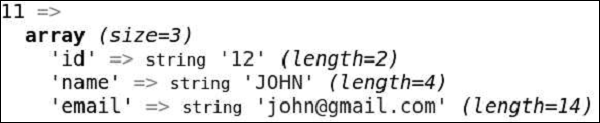
}第4步-类型的http://本地主机:8080 / index.php的R =网站/测试行为?在地址栏,你会看到名新创建的属性MYUSER模式是大写的。

作者:terry,如若转载,请注明出处:https://www.web176.com/yii/438.html
 支付宝
支付宝  微信
微信 