
I18N(国际化)是设计可适应各种语言的应用程序的过程。Yii提供了完整的I18N功能。
语言环境是一组参数,用于指定用户的语言和国家/地区。例如,en-US代表英语语言环境和美国。Yii提供两种语言:源语言和目标语言。源语言是用于编写应用程序中所有文本消息的语言。目标语言是应用于向最终用户显示内容的语言。
消息翻译组件将文本消息从源语言转换为目标语言。要翻译消息,消息翻译服务必须在消息源中查找它。
要使用消息翻译服务,您应该-
- 用Yii :: t()方法包装要翻译的文本消息。
- 配置消息源。
- 将消息存储在消息源中。
步骤1 -Yii :: t()方法可以像这样使用。
echo \Yii::t('app', 'This is a message to translate!');在以上代码段中,“ app”代表消息类别。
步骤2-现在,修改config / web.php文件。
<?php
   $params = require(__DIR__ . '/params.php');
   $config = [
      'id' => 'basic',
      'basePath' => dirname(__DIR__),
      'bootstrap' => ['log'],
      'components' => [
         'request' => [
            // !!! insert a secret key in the following (if it is empty) - this
               //is required by cookie validation
            'cookieValidationKey' => 'ymoaYrebZHa8gURuolioHGlK8fLXCKjO',
         ],
         'cache' => [
            'class' => 'yii\caching\FileCache',
         ],
         'i18n' => [
            'translations' => [
               'app*' => [
                  'class' => 'yii\i18n\PhpMessageSource',
                  'fileMap' => [
                     'app' => 'app.php'
                  ],
               ],
            ],
         ],
         'user' => [
            'identityClass' => 'app\models\User',
            'enableAutoLogin' => true,
         ],
         'errorHandler' => [
            'errorAction' => 'site/error',
         ],
         'mailer' => [
            'class' => 'yii\swiftmailer\Mailer',
            // send all mails to a file by default. You have to set
            // 'useFileTransport' to false and configure a transport
            // for the mailer to send real emails.
            'useFileTransport' => true,
         ],
         'log' => [
            'flushInterval' => 1,
            'traceLevel' => YII_DEBUG ? 3 : 0,
            'targets' => [
               [
                  'class' => 'yii\log\FileTarget',
                  'exportInterval' => 1,
                  'logVars' => [],
               ],
            ],
         ],
         'db' => require(__DIR__ . '/db.php'),
      ],
      // set target language to be Russian
      'language' => 'ru-RU',
      // set source language to be English
      'sourceLanguage' => 'en-US',
      'modules' => [
         'hello' => [
            'class' => 'app\modules\hello\Hello',
         ],
      ],
      'params' => $params,
   ];
   if (YII_ENV_DEV) {
      // configuration adjustments for 'dev' environment
      $config['bootstrap'][] = 'debug';
      $config['modules']['debug'] = [
         'class' => 'yii\debug\Module',
      ];
      $config['bootstrap'][] = 'gii';
      $config['modules']['gii'] = [
         'class' => 'yii\gii\Module',
      ];
   }
   return $config;
?>在上面的代码中,我们定义了源语言和目标语言。我们还指定了yii \ i18n \ PhpMessageSource支持的消息源。app *模式指示必须使用此特定消息源来翻译以app开头的所有消息类别。在上述配置中,所有俄语翻译都位于messages / ru-RU / app.php文件中。
步骤3-现在,创建messages / ru-RU目录结构。在ru-RU文件夹中,创建一个名为app.php的文件。这将存储所有EN→RU翻译。
<?php
   return [
      'This is a string to translate!' => 'Эта строка для перевода!'
   ];
?>第4步-在SiteController中创建一个名为actionTranslation()的函数。
public function actionTranslation() {
   echo \Yii::t('app', 'This is a string to translate!');
}步骤5-在网络浏览器中输入URL http:// localhost:8080 / index.php?r = site / translation,您将看到以下内容。
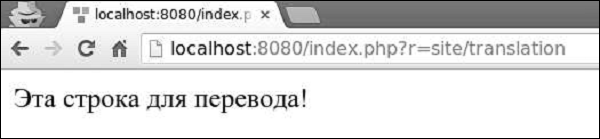

由于我们将目标语言设置为ru-RU,因此该消息已翻译成俄语。我们可以动态更改应用程序的语言。
步骤6-修改actionTranslation()方法。
public function actionTranslation() {
   \Yii::$app->language = 'en-US';
   echo \Yii::t('app', 'This is a string to translate!');
}
现在,该消息以英语显示
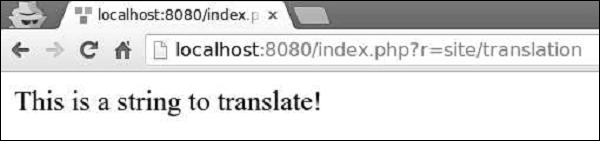
步骤7-在翻译后的消息中,您可以插入一个或多个参数。
public function actionTranslation() {
   $username = 'Vladimir';
   // display a translated message with username being "Vladimir"
   echo \Yii::t('app', 'Hello, {username}!', [
      'username' => $username,
   ]), "<br>";
   $username = 'John';
   // display a translated message with username being "John"
   echo \Yii::t('app', 'Hello, {username}!', [
      'username' => $username,
   ]), "<br>";
   $price = 150;
   $count = 3;
   $subtotal = 450;
   echo \Yii::t('app', 'Price: {0}, Count: {1}, Subtotal: {2}', [$price, $count, $subtotal]);
}
以下将是输出。
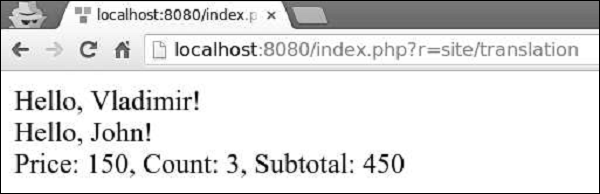
您可以翻译整个视图脚本,而不是翻译单个文本消息。例如,如果目标语言是ru-RU,并且您想翻译views / site / index.php视图文件,则应该翻译视图并将其保存在views / site / ru-RU目录下。
步骤8-创建views / site / ru-RU目录结构。然后,在ru-RU文件夹中,使用以下代码创建一个名为index.php的文件。
<?php
   /* @var $this yii\web\View */
   $this->title = 'My Yii Application';
?>

<div class = "site-index">
   <div class = "jumbotron">
      <h1>Добро пожаловать!</h1>
   </div>
</div>步骤9-目标语言是ru-RU,因此,如果输入URL http:// localhost:8080 / index.php?r = site / index,您将看到带有俄语翻译的页面。
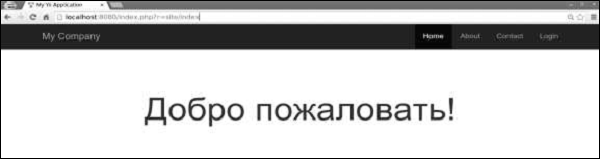
作者:terry,如若转载,请注明出处:https://www.web176.com/yii/347.html
 支付宝
支付宝  微信
微信 